What is GCafe Portal?
GCafe Portal runs on the server with GCafe Billing: shop-floor management (client PCs, billing, chat, orders, members), revenue, KPIs, the tax book, ads and more admin tools.
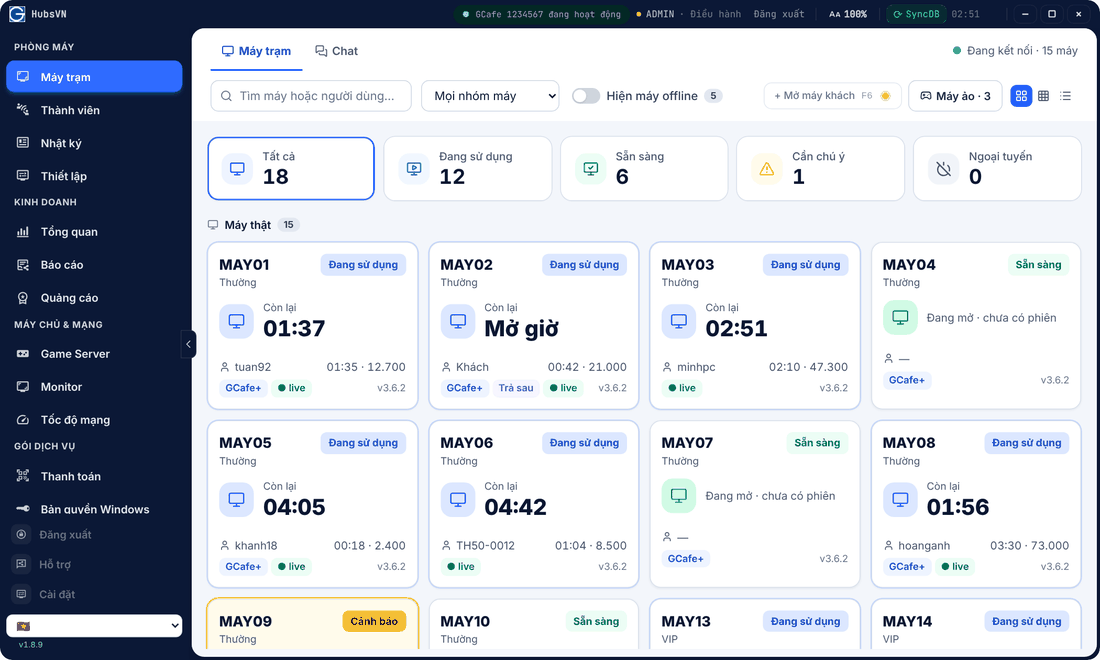
What GCafe Portal does
Shop floor
- Máy trạm (Clients): the whole shop, open PCs, check out, top up, order, control PCs, virtual machines (PlayStation, billiards…).
- Chat with clients, with sound alerts for messages, orders and top-up requests.
- Thành viên (Members): members, prepaid cards, staff and shift change.
- Nhật ký (Logs): system, transactions, web history.
- Thiết lập (Setup): pricing, website / app blocking, permissions, QR bank transfer.
Business and tools
- Tổng quan (Overview), Báo cáo (Reports, incl. the S1a-HKD tax book), Quảng cáo (Ads: banners, wallpapers, lucky wheel).
- Game Server, Monitor, Tốc độ mạng (Network speed).
- Thanh toán (renew GCafe Update by QR) and Bản quyền Windows (Windows licensing).
- Remote access from a phone.
Full Portal or alongside legacy?
Portal can handle all billing, or legacy GCafe Billing keeps billing while Portal covers the rest. See Two ways to use GCafe Portal.
Terms used in this guide
Term | Meaning |
|---|---|
CafeID | The shop’s 7-digit ID, used for renewal, sync and remote access. |
GCafe+ Server | The GCafe Billing counter software on the server; its accounts sign in to Portal. |
Client PC | A player’s PC running GCafe+ Client. |
Virtual machine (vClient) | A billed device without GCafe: PlayStation, billiard table, VR… |
GameMenu | The game launcher on client PCs; banners and the lucky wheel appear here. |
SyncDB | Sync GCafe Billing data into Portal. |
Where to start
- Open Portal and verify your CafeID.
- Sign in with a GCafe+ Server account.
- Get to know the interface and the Clients screen.
- Pick how you use Portal, then turn on remote access on your phone.