Getting to know the GCafe Portal interface
The GCafe Portal window has a title bar (shop status, account, font size, sync), a left menu in four groups and the content area in the middle.
Title bar

Item | Meaning |
|---|---|
GCafe … đang hoạt động | The shop’s subscription. Orange when ≤ 14 days remain, red when đã hết hạn (expired) — renew under Payment. |
ADMIN · Điều hành | Signed-in account and role; Đăng xuất signs out. |
AA 100% | Font size for every page and guest-call sound alerts. |
SyncDB and the clock | Sync GCafe Billing data now; the clock counts down to the next automatic sync. |
Left menu
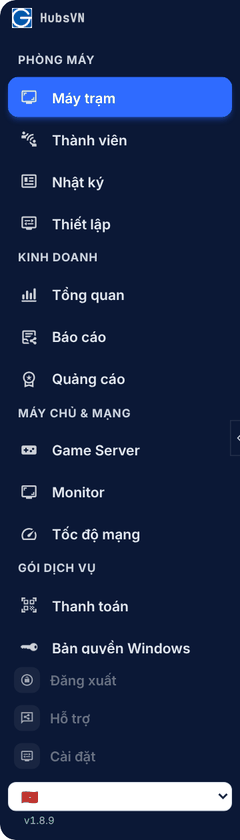
Group | Items | Used for |
|---|---|---|
Phòng máy (Shop floor) | Máy trạm, Thành viên, Nhật ký, Thiết lập | Counter work: PCs, chat, billing, members, pricing. |
Kinh doanh (Business) | Tổng quan, Báo cáo, Quảng cáo | Revenue, KPIs, tax book, banners, lucky wheel. |
Máy chủ & mạng (Server & network) | Game Server, Monitor, Tốc độ mạng | GCafe Update, hardware, Internet. |
Gói dịch vụ (Service plan) | Thanh toán, Bản quyền Windows | Renewal, Windows licenses. |
At the bottom: Đăng xuất (Sign out), Hỗ trợ (Support), Cài đặt (Settings), language and version. The arrow on the menu edge collapses / expands it.
Staff accounts see only the items they are allowed to use.
💡 Tip: Click SyncDB when a GCafe Billing transaction has not shown up in reports yet.